
Are you a church leader or volunteer dedicated to ensuring child safety and compliance? Discover three compelling reasons to embrace the Safe Ministry Check badge and learn how to seamlessly integrate it into your church or ministry website.
1. Strengthening Community Relationships
Your church website serves as a vital tool for conveying your beliefs and values to the local community. By prominently displaying the Safe Ministry Check badge, you send a clear message: the safety of your volunteers is paramount. It demonstrates your commitment to rigorous screening and comprehensive training in safe ministry practices.
2. Fostering Culture & Streamlining Communication
Adding our badge to your website is not just a symbol; it’s a statement. It tells your church or ministry community that safe ministry really matters to you. It also simplifies things for your members. With numerous training providers available, members can sometimes get lost in the process. Placing our badge on your website ensures your members can easily access their required training, providing clarity and ease.
3. Effortless Compliance
Align your church or ministry with the first principle of the National Principles for Child Safe Organisations: “Child safety and wellbeing is embedded in organisational leadership, governance, and culture.” The first action area of this principle emphasises that organisations should make a public commitment to child safety. Incorporating the Safe Ministry Check badge into your church or ministry website serves as a public declaration of your unwavering dedication to child safety. It’s a straightforward way to meet yet another compliance requirement.
How to:
To put our Badge of Certification on your website, login to your administration portal and navigate to your ‘Organisation Settings’. At the top of the page you will see the Certification Badge. Select ‘Details/Install’ to open the certification badge pop-up window and bring up the install options.
You have two options for adding the badge to your website:
1. Add image from URL
On the backend of your church website, you should have an option to add an image from a URL. Use the url address given on the certification badge pop-up page as the image source, and it will automatically link to your Public Commitments page.
2. Embed HTML
An alternative way to add the certification badge is by edit source or edit html. On the certification badge pop-up, copy the code and paste into your website’s html code. Paste this code into your page html. You can set the text colour with the “c” argument at the end of url.
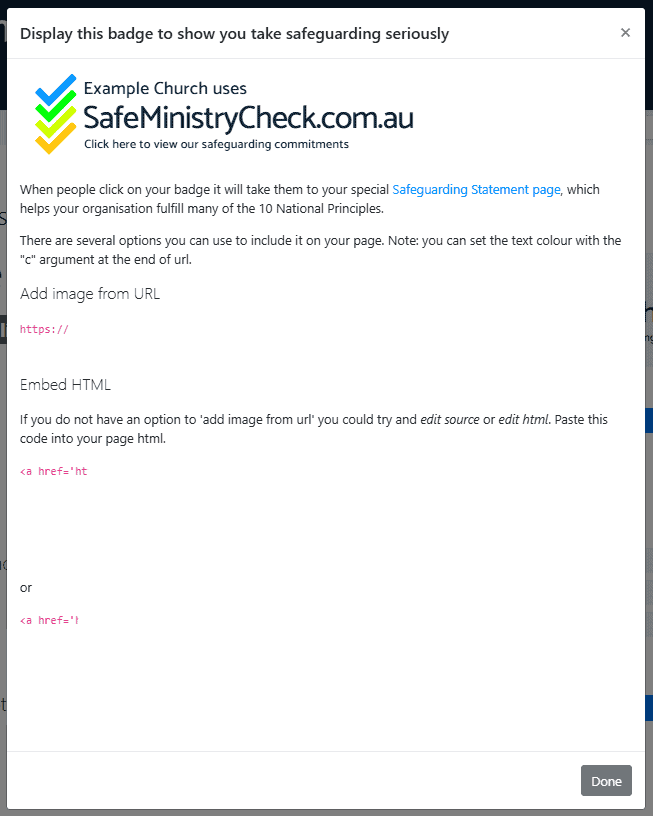
The certification badge shows those who visit your website that your ministry is serious about creating a culture of safeguarding and proper screening. Additionally, if people click on your badge it will take them to your special Public Commitments page, which helps your organisation fulfil many of the 10 National Principles.
If you require any assistance during this process, please get in contact with us via email at support@safeministrycheck.com.au.